Automatic Backup Function
Automatic Backup Function
Active Takeoff contains an automatic project backup function which saves a copy of the currently open project every 5 minutes. This function is useful when a problem occurs in the computer environment, especially when the currently open project has not been saved by the user. The most common causes of data loss are power outages, network problems and computer failures.
The backup system compares the dates and times of the last manual save from the user and the date and time of the last automatic backup. When the user manually saves a project, the automatic backup copy is deleted until it is regenerated 5 minutes later. If a computer problem occurs, only the last 5 minutes of work will be lost.
The automatic backup copy is saved in the same folder as the project itself. Its format is xxx(date).qpl.bak
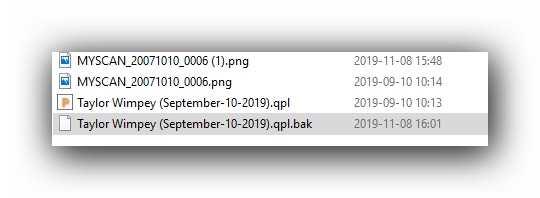
When a user opens a project which has not been properly saved due to an unexpected shutdown of Active Takeoff, this message will appear:
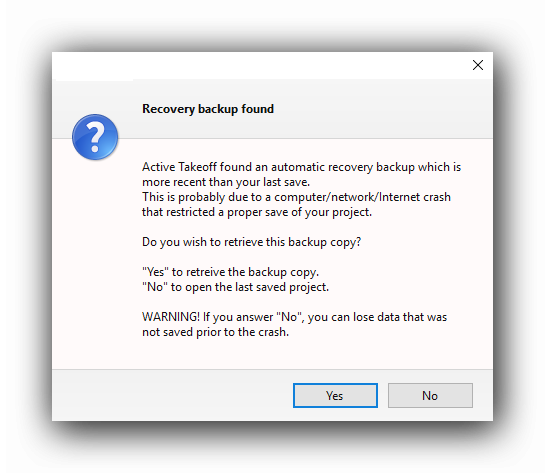
The user can choose to open the backup copy by clicking "Yes" or to open the last manual saved copy by clicking "No". In the case of the "No" answer, all the changes since the manual save will be lost.
When a backup copy is retrieved, the .qpl.bak is automatically renamed as a .qpl.last file ant the cycle starts over.
When the user manually saves the project, the .qpl.bak file is deleted until the next 5 minute cycle. However, the .qpl.last backup copy will remain and can eventually be renamed as a .qpl file and serve as an emergency backup.
Controlling the Automatic Backup Function
The Automatic Backup Function can be turned ON or OFF in the System Tools menu.
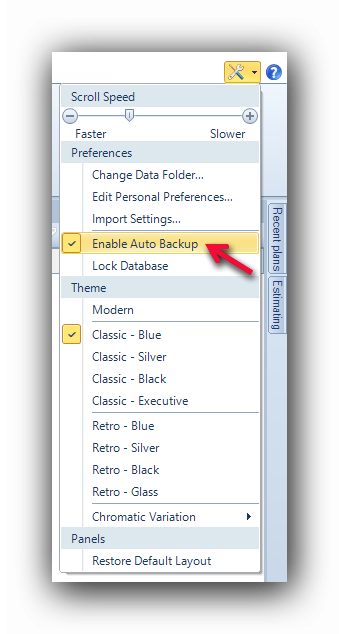
When the "Enable Auto Backup" line is checked, a backup copy of the open project will be performed every 5 minutes. If the line is not checked, the save function will have to be performed manually with the "Save" button.
See also :